> ## Documentation Index
> Fetch the complete documentation index at: https://docs.dezerx.com/llms.txt
> Use this file to discover all available pages before exploring further.
# Cashfree
> Follow this guide to connect Cashfree with Spartan
Cashfree is an **India-only** payment gateway. Checkout is processed in \**INR*, other currencies are converted using your configured or live exchange rates. Customers must have a valid phone number in their profile to complete a payment.
## Prerequisites
* Cashfree Account with an **activated** Payment Gateway
* Access to the Cashfree Merchant Dashboard
* Your application ready for integration
## Get Your API Credentials
Log in to the [Cashfree Merchant Dashboard](https://merchant.cashfree.com/) and click **Developers** in the top-right navigation, then go to **API Keys** under **Payment Gateway**.
* **Test environment**: API keys are generated automatically.
* **Production environment**: Click **Generate API Keys** and complete the OTP / 2FA authentication. Production keys can only be generated once your Payment Gateway is activated.
* **App ID** (`x-client-id`): Copy your client App ID.
* **Secret Key** (`x-client-secret`): Copy the secret key and keep it secure — never expose it publicly.
These map to the **Client App ID** and **Client Secret** fields in Spartan.
## Create Webhook
In the Cashfree Dashboard, go to **Developers → Webhooks** and click **Add Webhook Endpoint**.
Use the webhook callback URL shown on the Spartan Cashfree gateway page. It ends with `/api/cashfree/webhook/callback`.
For example:
```text theme={null}
https://yourdomain.com/api/cashfree/webhook/callback
```
Select the latest **webhook version** from the drop-down, then click **Test** to verify the endpoint returns a response, and click **Next**.
Select the events you want to monitor (such as successful payment, payment failure, and refunds), then click **Add Webhook**.
## Add Cashfree to Spartan
Log in to Spartan as an administrator, then go to **Modules → Gateways → Cashfree**.
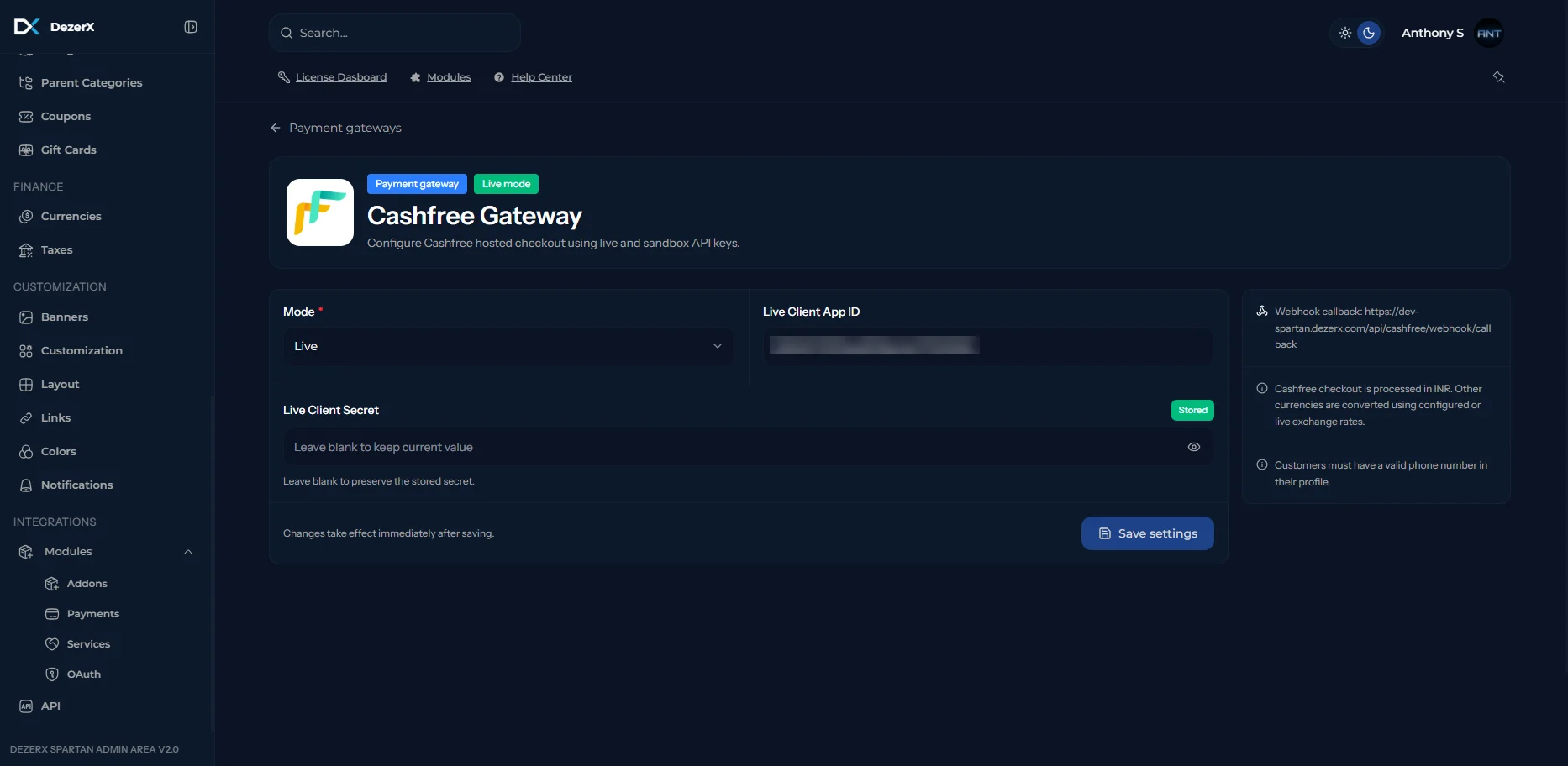 Enter the following credentials:
* **Mode**: Select **Live** for production, or **Sandbox** for testing.
* **Client App ID**: The App ID copied from Cashfree.
* **Client Secret**: The Secret Key copied from Cashfree. Leave blank to keep the current stored value.
Click **Save Settings** when complete. Changes take effect immediately after saving.
## Troubleshooting
### Common Issues
1. **Invalid Credentials**
* Verify the Client App ID and Client Secret are correct for the selected mode (Live vs. Sandbox).
* Make sure your Payment Gateway is activated to use Live keys.
* Ensure there are no extra spaces when copying credentials.
2. **Webhook Not Receiving Events**
* Check the webhook URL ends with `/api/cashfree/webhook/callback`.
* Verify the webhook URL is accessible publicly.
* Confirm the endpoint passed the **Test** check inside Cashfree.
* Check your server logs for errors.
3. **Payment Processing Failures**
* Ensure the customer has a valid phone number in their profile.
* Confirm payments are being processed in INR.
* Check your webhook configuration.
Enter the following credentials:
* **Mode**: Select **Live** for production, or **Sandbox** for testing.
* **Client App ID**: The App ID copied from Cashfree.
* **Client Secret**: The Secret Key copied from Cashfree. Leave blank to keep the current stored value.
Click **Save Settings** when complete. Changes take effect immediately after saving.
## Troubleshooting
### Common Issues
1. **Invalid Credentials**
* Verify the Client App ID and Client Secret are correct for the selected mode (Live vs. Sandbox).
* Make sure your Payment Gateway is activated to use Live keys.
* Ensure there are no extra spaces when copying credentials.
2. **Webhook Not Receiving Events**
* Check the webhook URL ends with `/api/cashfree/webhook/callback`.
* Verify the webhook URL is accessible publicly.
* Confirm the endpoint passed the **Test** check inside Cashfree.
* Check your server logs for errors.
3. **Payment Processing Failures**
* Ensure the customer has a valid phone number in their profile.
* Confirm payments are being processed in INR.
* Check your webhook configuration.