

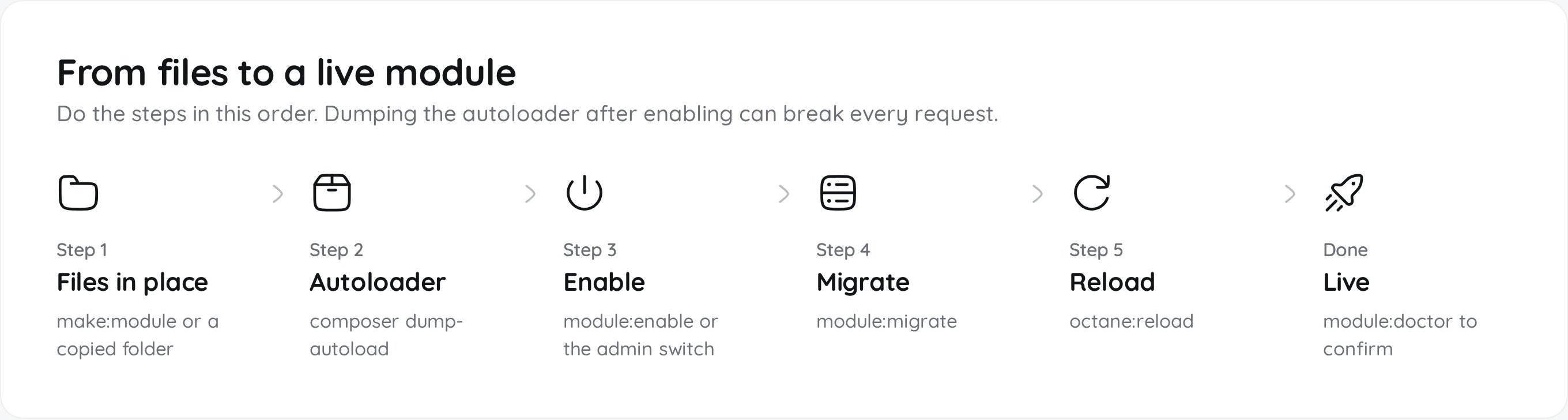
Enable a module
Whether a module is on is stored in themodule_statuses table. Editing modules_statuses.json by hand does nothing.
- Admin panel
- Command line
Open Admin, Modules and flip the switch. Enabling runs the module’s migrations and clears the permission and gateway caches. Octane picks up the new module list and reloads its workers by itself.
make:module leaves the module disabled and dumps the autoloader for you. --enable also enables and migrates it, after checking that the provider class loads.
I already broke it
I already broke it
Install a module you did not generate
1
Upload the zip
In Admin, Modules choose Upload module and pick a
.zip of up to 50 MB. It needs a folder with a module.json in it. The module lands in the right group folder, disabled.2
Or copy the folder
Put it in the folder that matches its category and make the site user own it.
3
Rebuild the frontend if it has pages
Only when the module ships
resources/js/register.ts.4
Enable it
Flip the switch in Admin, Modules, then run
module:doctor.If a module with the same name ships in a release, the release’s copy wins. Copy a bundled module under a new name instead of patching it. Keep the type suffix (
Service, Gateway, Provider) in the name, because the updater uses it to choose the folder.Make changes live
DezerX runs on Laravel Octane. Each worker boots once and serves thousands of requests, so saved code is not running until the workers reload.www-data.
Development and PHP-FPM servers
Development and PHP-FPM servers
composer dev:octane starts Octane with --watch. It reloads when PHP under Modules/*/*/app or Modules/*/*/routes changes.A server without the PHP extensions RoadRunner needs runs PHP-FPM instead. Reload PHP-FPM there, for example sudo systemctl reload php8.4-fpm. systemctl status dezerx-octane tells you which one you have.Code that is safe in a worker
Never exit() or die()
Never exit() or die()
They stop the worker, not just the request. Throw the response instead:
throw new HttpResponseException(redirect('/login'));Boot code runs once per worker
Boot code runs once per worker
boot(), bootModule(), registerModule() and the top of route files run at worker start. Register routes, listeners and bindings there. Never read the user, request, session or a setting there. Put per-request work in a middleware and append it from bootModule():No request state in statics or singletons
No request state in statics or singletons
They live as long as the worker, so the next customer sees them. Bind per-request services with
scoped().Register listeners once
Register listeners once
Event::listen() and View::composer() in a controller pile up and slow every later request. Register them in your provider.When it does not work
Symptom and cause
Symptom and cause