

Prerequisites
- Cashfree Account with an activated Payment Gateway
- Access to the Cashfree Merchant Dashboard
- Your application ready for integration
Get Your API Credentials
1
Open the Developers section
Log in to the Cashfree Merchant Dashboard and click Developers in the top-right navigation, then go to API Keys under Payment Gateway.
2
Generate your API keys
- Test environment: API keys are generated automatically.
- Production environment: Click Generate API Keys and complete the OTP / 2FA authentication. Production keys can only be generated once your Payment Gateway is activated.
3
Copy your credentials
- App ID (
x-client-id): Copy your client App ID. - Secret Key (
x-client-secret): Copy the secret key and keep it secure — never expose it publicly.
Create Webhook
1
Open the webhook settings
In the Cashfree Dashboard, go to Developers → Webhooks and click Add Webhook Endpoint.
2
Set the webhook URL
Use the webhook callback URL shown on the Spartan Cashfree gateway page. It ends with Select the latest webhook version from the drop-down, then click Test to verify the endpoint returns a response, and click Next.
/api/cashfree/webhook/callback.For example:3
Select events and save
Select the events you want to monitor (such as successful payment, payment failure, and refunds), then click Add Webhook.
Add Cashfree to Spartan
1
Open the Cashfree gateway
Log in to Spartan as an administrator, then go to Modules → Gateways → Cashfree.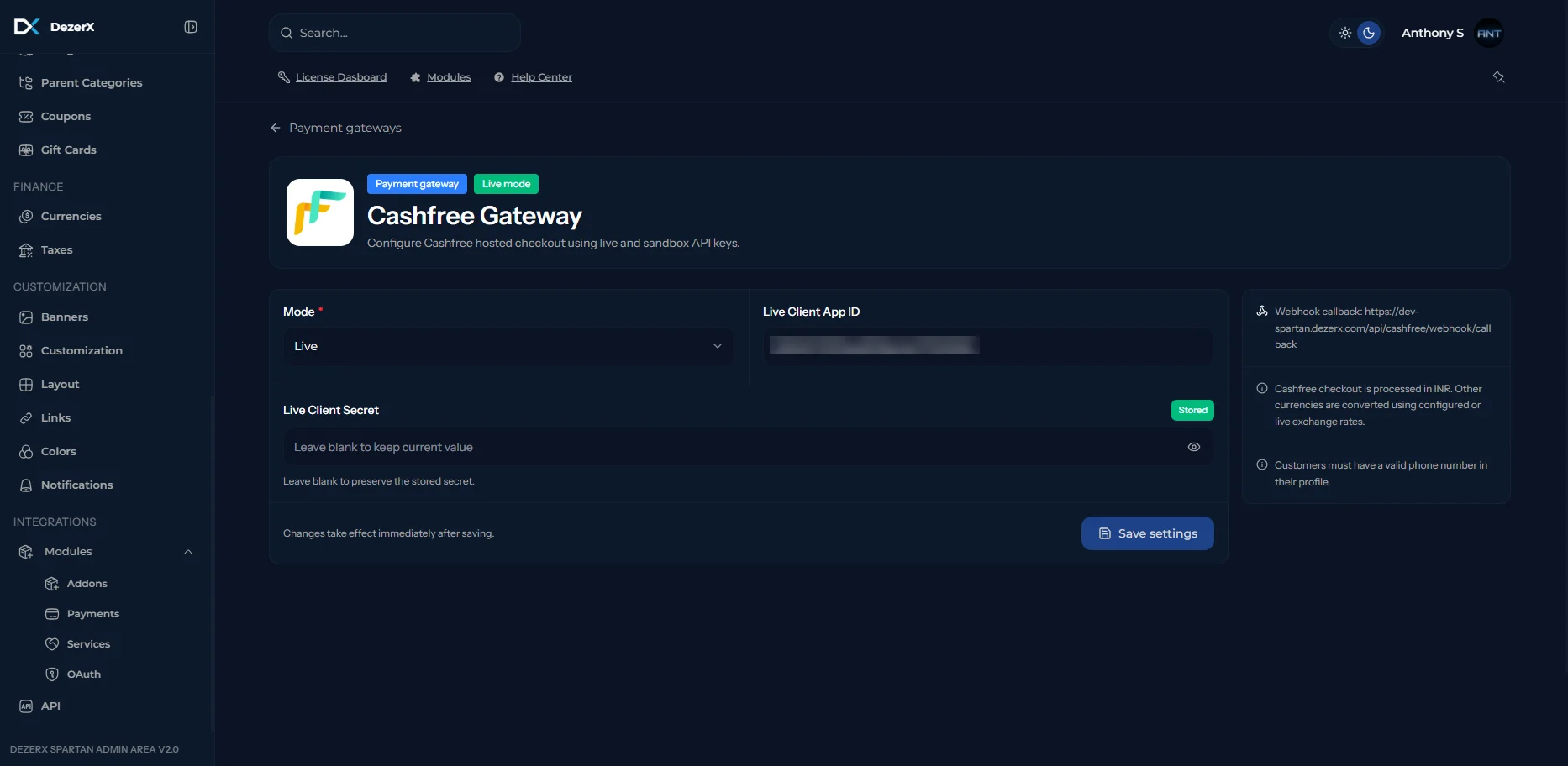
2
Enter the Cashfree credentials
Enter the following credentials:
- Mode: Select Live for production, or Sandbox for testing.
- Client App ID: The App ID copied from Cashfree.
- Client Secret: The Secret Key copied from Cashfree. Leave blank to keep the current stored value.
Troubleshooting
Common Issues
-
Invalid Credentials
- Verify the Client App ID and Client Secret are correct for the selected mode (Live vs. Sandbox).
- Make sure your Payment Gateway is activated to use Live keys.
- Ensure there are no extra spaces when copying credentials.
-
Webhook Not Receiving Events
- Check the webhook URL ends with
/api/cashfree/webhook/callback. - Verify the webhook URL is accessible publicly.
- Confirm the endpoint passed the Test check inside Cashfree.
- Check your server logs for errors.
- Check the webhook URL ends with
-
Payment Processing Failures
- Ensure the customer has a valid phone number in their profile.
- Confirm payments are being processed in INR.
- Check your webhook configuration.